Zoom Scheduling, Balanced Automatically
ZoomSync connects to your agency's own Zoom licenses, spreads meetings across accounts so no one gets overbooked, and hands your team a ready-to-share join-info block for every deposition — no manual license juggling.
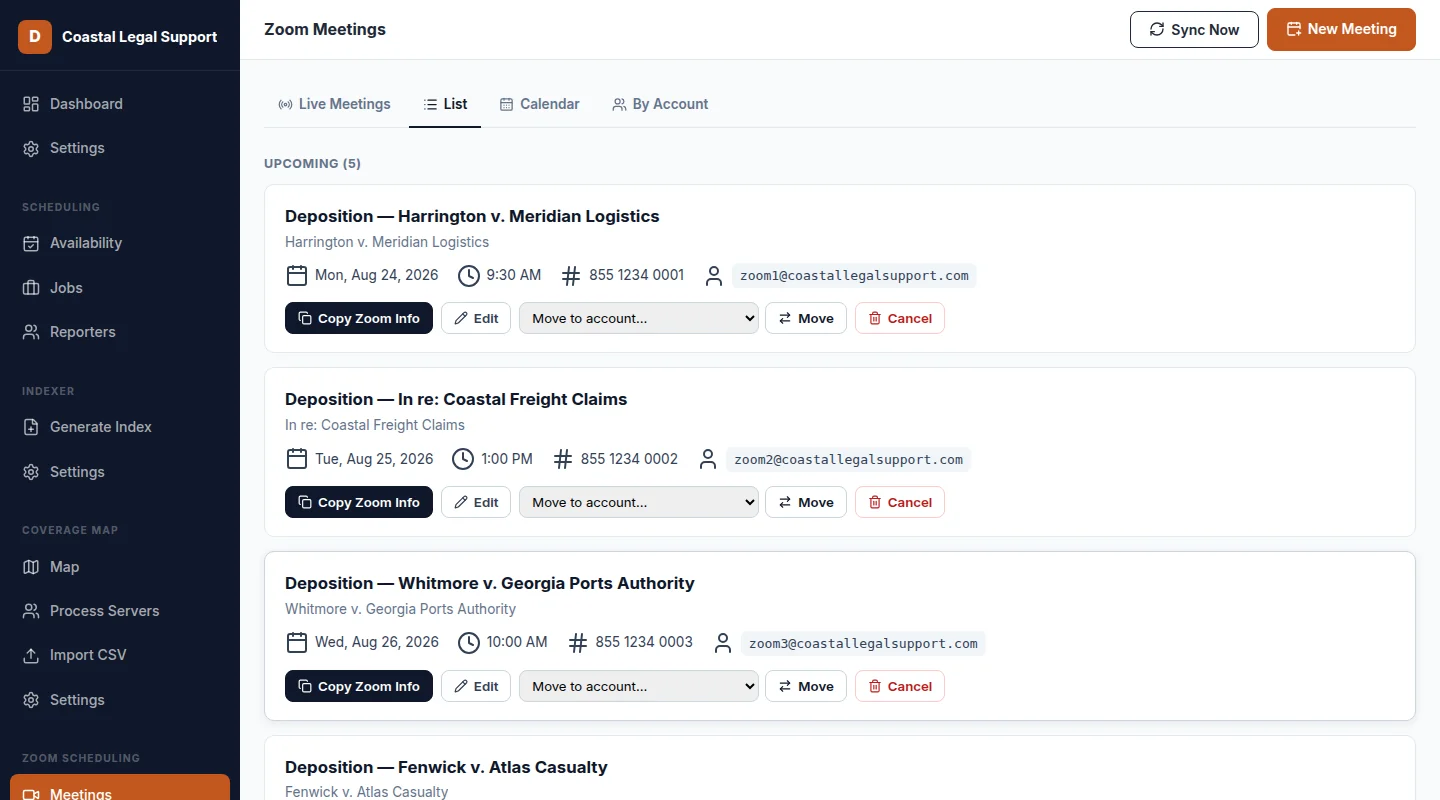
Everything You Need to Schedule Remote Depositions
ZoomSync replaces manually tracking which Zoom license is free with one balanced, agency-wide view.
Automatic Account Balancing
New meetings are assigned to whichever connected Zoom account is least used that day, capped per account, so no single license gets overbooked.
Server-to-Server OAuth
Connect your agency's Zoom licenses once through a secure server-to-server connection — no individual Zoom logins for your team.
One-Click Copy Join Info
Copy the join link, meeting ID, passcode, and dial-in numbers together as one formatted block, ready to paste into a calendar invite.
List & Calendar Views
See every scheduled meeting across every connected account in a list or a month calendar, filterable down to a single account.
Multi-Day Meeting Support
Depositions that span more than one day are scheduled and tracked as a single meeting, not a series of one-offs to manage separately.
Instant Reassign or Cancel
Move a meeting to a different Zoom account or cancel it outright in a couple of clicks, without digging through the Zoom admin console.
How ZoomSync Works
From connecting your licenses to sharing join info, without a spreadsheet in sight.
Connect Your Zoom Accounts
A one-time server-to-server OAuth connection links your agency's Zoom licenses — no per-user Zoom logins required.
Schedule a Meeting
ZoomSync picks the least-used connected account automatically to keep every license balanced, or your team can choose one directly.
Copy & Share
Grab the full join-info block with one click and drop it straight into a calendar invite or email to the deposition participants.
More Tools for Legal Support Operations
ZoomSync is one of four tools DocketForge builds for legal support back-offices.
ZoomSync FAQ
Answers to the questions we hear most about scheduling remote depositions.
Does every team member need their own Zoom account?
No. ZoomSync connects to your agency's Zoom licenses once through a secure server-to-server connection. Your team schedules meetings without needing individual Zoom host logins.
How does ZoomSync decide which Zoom account hosts a meeting?
ZoomSync tracks how many meetings each connected Zoom account is already hosting that day and automatically assigns new meetings to the least-used account, keeping your licenses balanced without any manual tracking.
Can I see every upcoming meeting across all our Zoom accounts in one place?
Yes. ZoomSync's list and month-calendar views show every scheduled meeting across every connected account, and you can filter down to a single account at any time.
What's included when I copy a meeting's join information?
The join link, meeting ID, passcode, and dial-in numbers are all copied together as one formatted block, ready to paste directly into a calendar invite or email.
Let's balance your Zoom scheduling.
Tell us how many Zoom licenses your agency juggles today. We'll show you how ZoomSync keeps them balanced automatically.
Request a Demo
Fill out the form below and we'll get back to you to schedule a quick call.