Exhibit Indexes, Built in Seconds
CaseLink connects to your Dropbox, catalogs every file in a case folder, and generates a professional hyperlinked PDF and Word index — no more building indexes by hand, file by file.
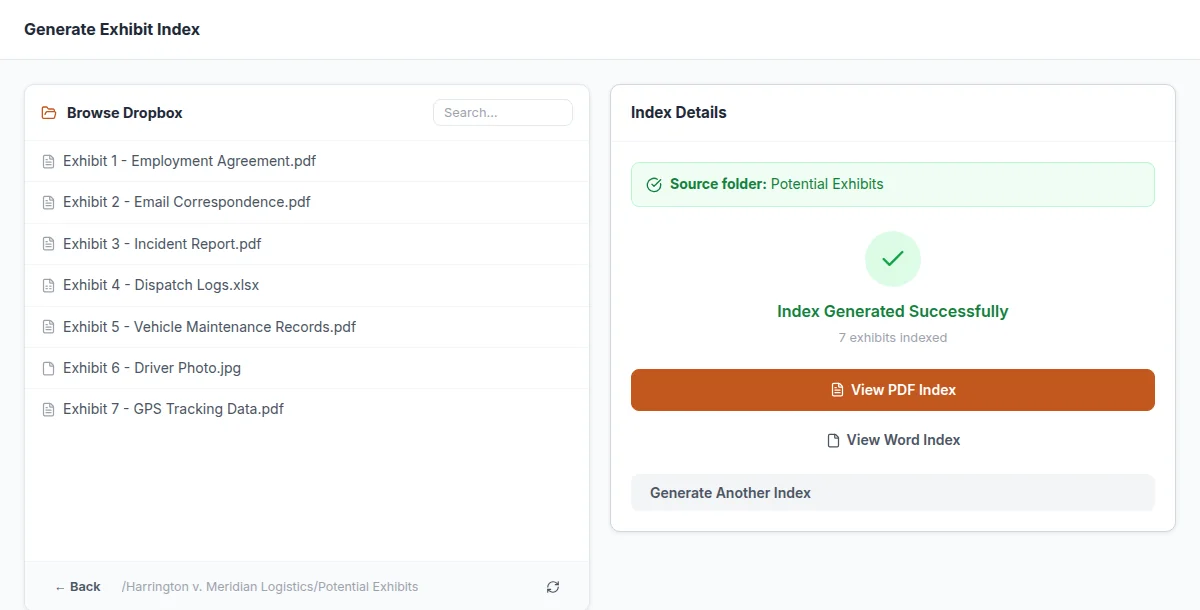
Everything You Need to Index a Case File
CaseLink replaces file-by-file manual indexing with a few clicks.
One-Time Dropbox Connection
Connect your agency's Dropbox once. CaseLink securely accesses your case folders — no re-authenticating every time.
In-App Folder Browser
Browse your Dropbox case folders directly inside CaseLink — no tab-switching, no digging through nested folders.
Hyperlinked PDF & Word Indexes
Generates both a PDF and a Word exhibit index with clickable links straight to each document — ready to hand off.
Configurable Document ID Modes
Match however your agency already numbers exhibits: no ID, sequential, alphabetical, or filename prefix.
Automatic Upload Back to Dropbox
Finished indexes upload straight back to the case folder in Dropbox — nothing to download and re-upload by hand.
Natural File Sorting
Handles file names the way people actually read them — "Exhibit 2" sorts before "Exhibit 21," not after.
How CaseLink Works
From a folder of files to a finished exhibit index, without touching a spreadsheet.
Connect & Browse
Connect your Dropbox once, then browse to any case's exhibit folder right from inside CaseLink.
Fill In Case Details
Enter the case name, deponent, and how you want documents numbered.
Generate & Upload
CaseLink builds a hyperlinked PDF and Word index in seconds and uploads both back to Dropbox automatically.
More Tools for Legal Support Operations
CaseLink is one of four tools DocketForge builds for legal support back-offices.
CaseLink FAQ
Answers to the questions we hear most from litigation support teams.
Which cloud storage providers does CaseLink support?
CaseLink currently connects to Dropbox. Support for Google Drive, SharePoint, Box, and Egnyte is in development.
How long does it take to generate an exhibit index?
Seconds, regardless of folder size. What used to take a paralegal 20–30 minutes per case file happens automatically.
Can we control how exhibits are numbered?
Yes. Choose no ID, sequential numbers, alphabetical labels, or a filename prefix — whatever convention your agency already uses.
Does CaseLink change or move our original files?
No. CaseLink only reads your exhibit files to build the index; the generated PDF and Word documents are uploaded as new files back to the same case folder.
Let's speed up your exhibit indexing.
Tell us how your team builds exhibit indexes today. We'll show you how CaseLink fixes it.
Request a Demo
Fill out the form below and we'll get back to you to schedule a quick call.