Court Reporter Scheduling, Automated
DepoSync sends availability requests to your freelance reporter roster, collects responses through a branded form, and confirms assignments automatically — so your team stops chasing coverage over email.
Everything You Need to Staff a Deposition
DepoSync replaces the spreadsheet-and-email shuffle with one live view of your entire roster.
Automated Availability Blasts
Send weekly availability requests to your whole freelance reporter roster automatically, on whatever day and time works for your agency — or trigger one manually anytime.
No-Login Reporter Forms
Reporters respond through a branded web form with no account or password required — just a secure, one-time link delivered by email.
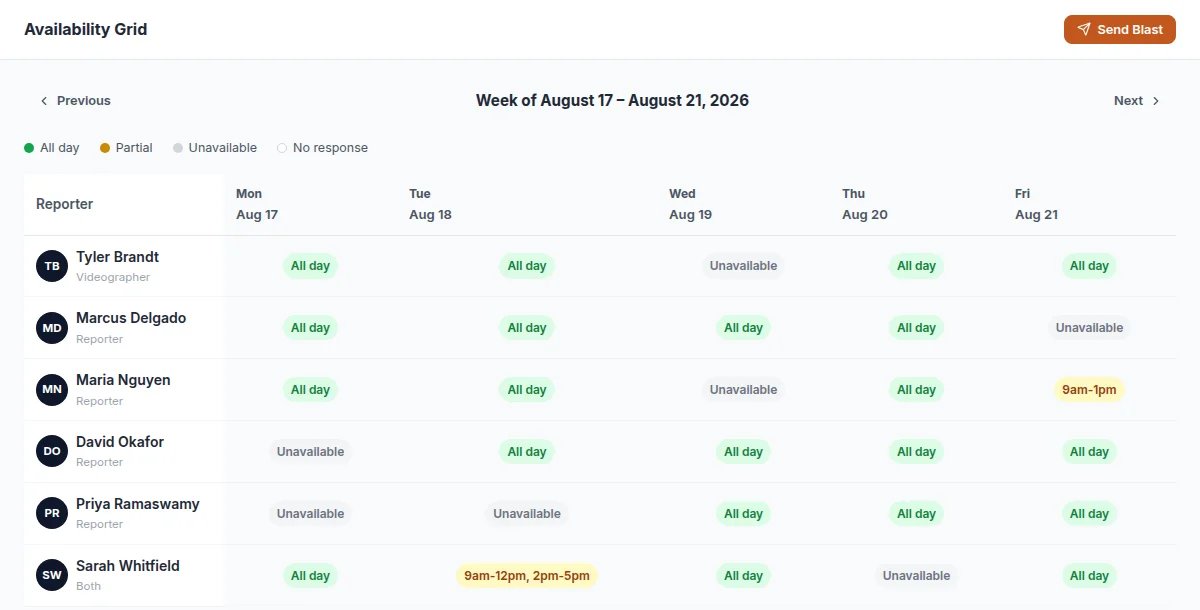
Live Availability Grid
See your whole roster's availability for the week in one grid — who's open, who's partial, and who hasn't responded yet.
One-Click Confirm or Decline
Reporters confirm or decline a job assignment with a single click from their email — no phone tag, no waiting around.
Automatic Calendar Invites
The moment a reporter confirms, a calendar invite goes out through your agency's own connected Outlook or Google account.
Instant Decline Alerts
If a reporter declines, your admin team is notified immediately so the next available reporter can be assigned without missing a beat.
How DepoSync Works
From availability request to confirmed job, without a single manual email.
Send the Weekly Blast
On your schedule — or with one click — DepoSync emails your entire active reporter roster asking for availability.
Reporters Respond in Seconds
Each reporter gets a unique link to a branded form — no login required — where they mark their availability for the week.
Assign & Confirm Automatically
Pick an available reporter for a job. DepoSync emails the assignment, and confirmation triggers a calendar invite automatically.
More Tools for Legal Support Operations
DepoSync is one of four tools DocketForge builds for legal support back-offices.
DepoSync FAQ
Answers to the questions we hear most from court reporting agencies.
Do freelance reporters need to install anything or create an account?
No. Reporters receive a secure, one-time email link to a branded availability form. There's nothing to install and no password to remember.
What happens if a reporter declines an assignment?
Your admin team gets an instant alert so you can reassign the job to the next available reporter immediately, without losing time.
Can we still manually assign a job without waiting for the weekly blast?
Yes. Availability blasts run on a schedule you set, but admins can create and assign jobs manually at any time using whatever availability has already been collected.
Does DepoSync send emails from our own agency's email address?
Yes. DepoSync connects to your agency's own Microsoft 365 or Google account, so every email reporters receive comes from your domain, not a third party.
Let's automate your scheduling.
Tell us about your reporter scheduling headaches. We'll show you how DepoSync fixes it.
Request a Demo
Fill out the form below and we'll get back to you to schedule a quick call.